One Chat to Run It All — How My AI Assistant Is Put Together
I wanted one interface for everything — email, memory, research, reminders, my job search — and that interface had to be a chat. Here's the architecture behind it, the decisions that held up, and the ones I had to undo.
October 9, 2026 (Today)
7 min read
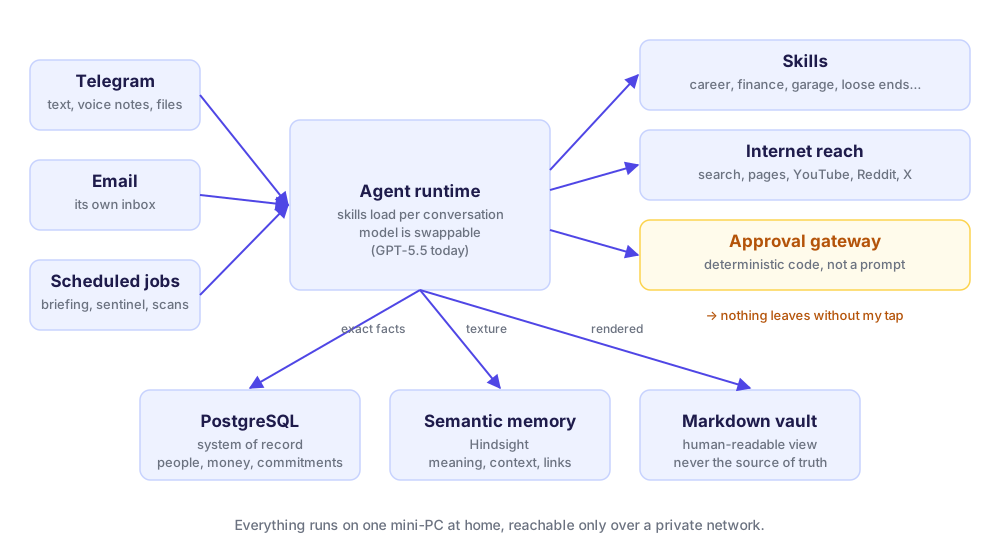
The brief I gave myself was short: everything I need from an assistant has to work from one chat window. Not an app with twelve tabs. Not a dashboard I have to remember to open. One Telegram conversation that I can type into, send a voice note to, or forward a file to, from my phone, in the field, between two other things.
That one constraint shaped almost every decision below. I've written separately about the safety model, the memory layer and the backups. This post is the overview: how the pieces fit, and why.
Why a chat, and not an app
I build software for a living, so the obvious move was to build an app. I did build a dashboard, and I still use it. But the dashboard is for looking. The chat is for doing, and doing is where an assistant earns its keep.
A chat also solves problems I didn't want to solve myself:
- It's already on every device I own. No install, no login, works on a bad connection.
- Voice notes are free. I talk, it transcribes. I bias the transcription with a vocabulary built every night from the names in my own database, so it hears "neunek" and my colleagues' names correctly instead of guessing.
- The model already speaks chat. Every capability is a conversation, so adding one doesn't mean designing a new screen.
The cost of a chat interface is discoverability: you can't see what it can do. I handle that with a plain capability list on the dashboard and by keeping the number of capabilities small. More on that at the end.
The runtime: boring, open, swappable
The agent runs on Hermes Agent, an open-source runtime from Nous Research, on a small Linux mini-PC at home. It gives me the parts I'd otherwise write badly myself: a Telegram and email gateway, scheduled jobs, a skills system and tool calling. The mini-PC has no GPU. The thinking happens in a hosted model; everything else, data included, stays on the box.
The single most useful property of the runtime is that the model is a setting, not a dependency. I learned why the hard way. In July I moved the assistant from GPT to Claude for better reasoning. Within a week the pay-per-token bill had drained the balance, and every scheduled job failed silently on the morning it ran out. I moved back to a flat-rate subscription the same day, with nothing to migrate: same skills, same memory, different model. The data is the asset. The model is a part I expect to replace.
Skills, not a crowd of agents
The fashionable design is a swarm: a finance agent, an email agent, a research agent, all talking to each other. I tried the idea on paper and it fell apart on one question. Who do I talk to? With one chat, the answer has to be "one assistant."
So each domain is a skill: a written playbook the assistant loads when the conversation needs it. Today there are about a dozen:
- Career desk. I send a job link; it reads the posting, picks and rewords bullets from a fact-locked profile, and replies with a one-page CV, a cover note and a LinkedIn message. It refuses to add a skill or a number that isn't in my profile.
- Loose ends. Every commitment I make, and every one owed to me, with follow-ups.
- Garage, finance, subscriptions. Service history for three vehicles, a read-only view of investments, what I pay for every month.
- Tone profiles. How I write to different people, so drafts sound like me.
- Second brain. Notes, people, projects. The glue for everything else.
Skills share one memory and one conversation, which is the point. When I ask the career desk about a company, it can see that I met someone from there last month.
Reading the internet
An assistant that can only read my data is a filing cabinet. It needs to read the world: search the web, pull a page, get a YouTube transcript, see what people on Reddit say about a product.
I use a router called Agent Reach that picks the right backend per platform: a search API for the open web, a reader for articles, subtitles for video, logged-in clients for social sites. One rule matters more than the tooling. The assistant uses its own accounts, never mine. It has its own email, its own X account and its own Reddit account. If a bot account gets flagged, I lose nothing. If my account got flagged because of my assistant, I'd lose a lot.
Memory: why it's three stores, not one
This is the decision I'd defend hardest. Almost every "AI memory" product is one vector database: throw everything in, retrieve by similarity. That's great for some questions and dangerous for others.
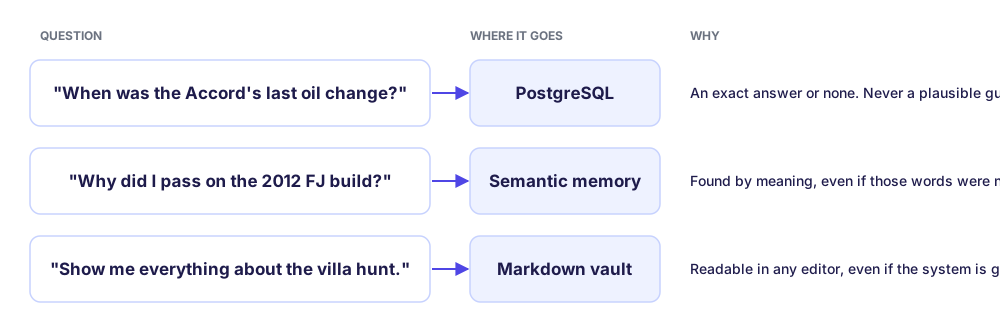
- PostgreSQL is the system of record. People, projects, commitments, vehicles, service records, subscriptions. When I ask for the last oil change, I want a date or "I don't know." A plausible guess is worse than no answer.
- Semantic memory (Hindsight) holds the texture. Conversations, reasoning, preferences, my old Notion workspace, three vehicle manuals: around 11,000 memory nodes now. It pulls out the people, places and things in what I tell it and links related memories, so a question finds its answer by meaning even when I phrase it differently from how I said it the first time.
- A markdown vault is the human view. A folder of readable notes generated from the other two. It is never the source of truth, but if the whole system died tomorrow, that folder would still make sense in any text editor.
The rule that keeps this sane: exact facts go to the database through a controlled write path; everything soft goes to semantic memory. The model can read anything. It can't quietly rewrite a date.
Nothing leaves without a tap
The assistant reads my email but never sends one on its own. Every outbound action, whether an email, a calendar invite or a post, becomes a proposal I approve with one tap. That check lives in plain code, not in a prompt asking the model to be careful, so a confused model can't talk its way past it. I wrote about this in detail in the approval gateway pattern.
Running it like production
A personal project that breaks silently is worse than no project, because you stop trusting it. So it runs the way I'd want a system at work to run:
- Scheduled jobs for the morning briefing, market scans and a nightly memory sync, each wrapped so a failure becomes a message to me instead of silence.
- A health sentinel every six hours that checks the gateway, the database, failed jobs and unusual spending, and stays quiet when everything is fine.
- Nightly backups off the box, and a quarterly restore drill, because a backup you've never restored is a hypothesis.
- Pinned versions and a written update routine. I patch a few things in the runtime, and an unattended update would quietly undo those patches.
What I cut, and why that was the best decision
By September the system did a lot. It also had a wearable voice recorder pipeline, a 3D "command center" dashboard with an animated orb, and an opportunity-scanning desk. They all worked, and I wasn't using most of them.
So I reset with one rule: fewer features, easier to use. I sold the recorder and removed its pipeline. I scrapped the 3D stage and kept the plain dashboard. I deleted the opportunity desk. The assistant got better overnight, because the things left were the things I actually reach for.
That's the real lesson of building your own assistant. Getting it to do things is the easy part now. The hard part is deciding what it shouldn't do, so that the one chat window stays something you trust and actually open.
Here are some other articles you might find interesting.
Building a Personal AI Chief of Staff — Notes From a Real Engagement
I run a self-hosted AI chief-of-staff for myself. A friend who runs deal-flow at a family office asked for one. Here's the architecture, the build plan, and the design decisions that actually matter.
Owning Your Social Graph Without Scraping
I linked my Instagram followers and following to my personal CRM, classified 900 accounts into topical buckets, and built an unfollow workflow — using only official data exports. No scraping, no API abuse, no account risk.

Subscribe to my newsletter
A periodic update about my life, recent blog posts, how-tos, and discoveries.
NO SPAM. I never send spam. You can unsubscribe at any time!