Home Lab '22 — A Small Server That Holds the Whole Family's Photos
In 2022 I built a home server for about AED 4,300: three 6 TB drives in RAID 5, Proxmox for isolation, and the services my family actually uses. Here's the hardware, the reasoning, and what I'd tell myself before starting.
October 9, 2026 (Today)
5 min read
There's an old joke at the top of my build notes: how many programmers does it take to change a light bulb? None, it's a hardware problem. The home lab was my attempt to stop treating hardware as somebody else's problem.
The goal was practical. Our photos were spread across phones, laptops and a few external drives. Sharing files with family meant WhatsApp compression or a paid cloud plan. I wanted one place at home that held everything, that I understood end to end, and that I could also break on purpose to learn.
The hardware, and why each piece
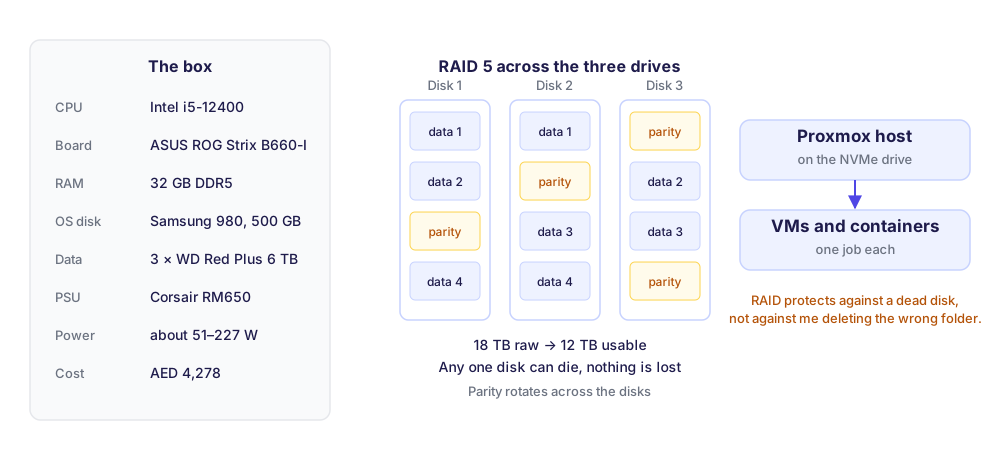
I built it in October 2022. The final list:
| Part | Choice | Price (AED) |
|---|---|---|
| CPU | Intel Core i5-12400 | 764 |
| Motherboard | ASUS ROG Strix B660-I (mini-ITX) | 781 |
| RAM | Kingston FURY Beast DDR5, 32 GB | 649 |
| OS drive | Samsung 980 NVMe, 500 GB | 184 |
| Data drives | 3 × WD Red Plus 6 TB | 1,525 |
| Power supply | Corsair RM650 | 338 |
| Case | Corsair Obsidian 250D | gift |
| Total | 4,278 |
The CPU was the real decision. I compared five options: the Ryzen 5 5600 and 5600G, and Intel's i5-10400, 11400 and 12400. The 12400 scored close to the top of that list on the benchmark I used, at a fair price. It also has integrated graphics, so the box needs no graphics card and Intel's hardware video engine is there for photo and video work. The Ryzen 5 5600 was the only option with ECC memory support, which matters for a storage server. For a family photo library on a budget, I took the iGPU and the efficiency.
Mini-ITX because it lives in a home, not a rack. It sits in a small case on a shelf. Its power figures are about 51 W at the low end and 227 W flat out. Idle is what matters, because a home server spends nearly all of its life waiting.
NAS drives for the data. WD Red Plus drives are built to spin 24/7 in a multi-drive box, which desktop drives aren't. The operating system lives on its own small NVMe drive, so the data disks only ever hold data.
Why RAID 5
Three 6 TB drives give 18 TB raw. With RAID 5, data and a parity block are striped across all three drives, with the parity rotating between them. The result:
- 12 TB usable out of 18.
- Any one drive can fail and nothing is lost. Replace it, the array rebuilds from the other two.
- Reads are spread across three disks, so it's quicker than one drive on its own. In my tests the array read at roughly 385–405 MB/s.
Mirroring (RAID 1) would have been simpler but leaves only half the space. With no redundancy at all, I'd be one dead drive away from losing every photo. For three drives, RAID 5 was the right trade between space and safety.
What RAID 5 is not is a backup. It protects against a dead disk. It does nothing if I delete the wrong folder, if ransomware encrypts the share, or if the house floods. That distinction cost me some comfort later, and it's why I now test restores rather than trusting that copies exist.
Proxmox, and why everything runs in its own box
The server runs Proxmox, a hypervisor, on the NVMe drive. Everything else runs on top of it in virtual machines or containers. This is the part that made the home lab fun rather than stressful:
- Isolation. A broken experiment stays broken on its own. If I wreck a test VM at midnight, the family photo library doesn't notice.
- Snapshots. Before any risky change I take a snapshot. If the change goes wrong, I roll back in seconds instead of rebuilding.
- Room to learn. I can spin up a router, a fresh Ubuntu or a new storage OS without touching anything that matters, which is how a lot of my Linux and networking practice happened.
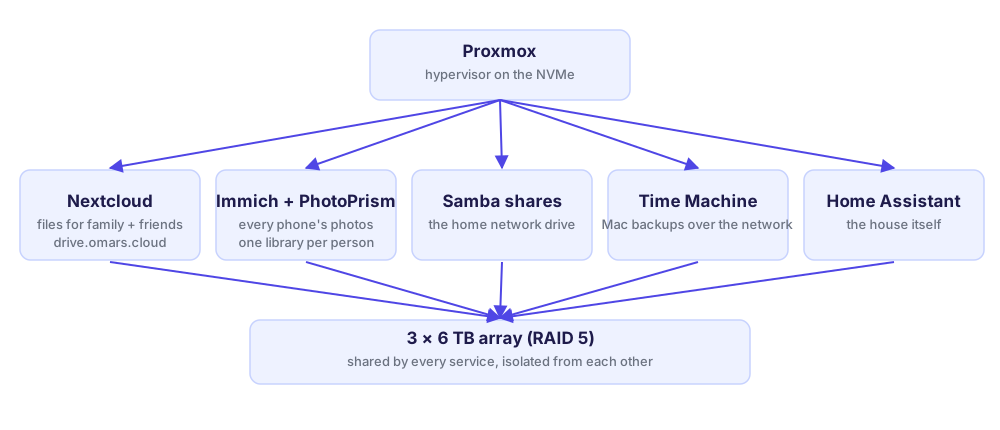
What it actually does for the family
- Nextcloud is our private Dropbox. It's reachable from outside the house at my own domain, so I can send family and friends a link to a folder of full-quality files instead of compressed WhatsApp copies.
- Immich and PhotoPrism hold the photos. Immich backs up everyone's phone automatically, with a separate library per person. PhotoPrism is where I organise and browse the older archive.
- Samba shares make the server show up as a normal network drive on every laptop at home.
- Time Machine backups for the Macs go to the server over the network instead of to a USB drive someone forgets to plug in.
- Home Assistant runs the house automations, and a small dashboard links to all of it.
What I'd tell myself in 2022
- Write down why, not just what. My notes say exactly what I bought and which commands I ran, and almost nothing about why. Three years later, the why is what I needed.
- Pick less, finish more. My list of services I meant to add (ad blocking, a VPN, a reverse proxy with single sign-on, media streaming, a virtual firewall) is longer than the list of what's running. The services that run are the ones the family uses daily.
- RAID first, then a real backup. RAID kept the photos safe from a dead drive. An off-site copy and a tested restore are what keep them safe from everything else.
- Idle power is the running cost. At around 51 W at the low end, a small efficient box is cheaper over its life than a "better" one that's never fully used.
The same habits carried straight into my next project: the AI assistant runs on a small Linux box at home, isolated, backed up off-site, with restore drills on the calendar.
Here are some other articles you might find interesting.

Barjeel — Checking UAE Property Prices Against What Actually Sold
I was looking at property to invest in and couldn't tell a good asking price from a hopeful one. So I built a tool that pulls listings, compares them with government-recorded sales, and scores every deal from 0 to 100. Here's how it works and what it found.
One Chat to Run It All — How My AI Assistant Is Put Together
I wanted one interface for everything — email, memory, research, reminders, my job search — and that interface had to be a chat. Here's the architecture behind it, the decisions that held up, and the ones I had to undo.
Subscribe to my newsletter
A periodic update about my life, recent blog posts, how-tos, and discoveries.
NO SPAM. I never send spam. You can unsubscribe at any time!